Customer Journey Map: From Onboarding to Scale
Mapping the full journey from first setup to long-term usage showed that complexity wasn't one feature — it accumulated across stages.
Research · Journey Mapping · AI Workflows
Context
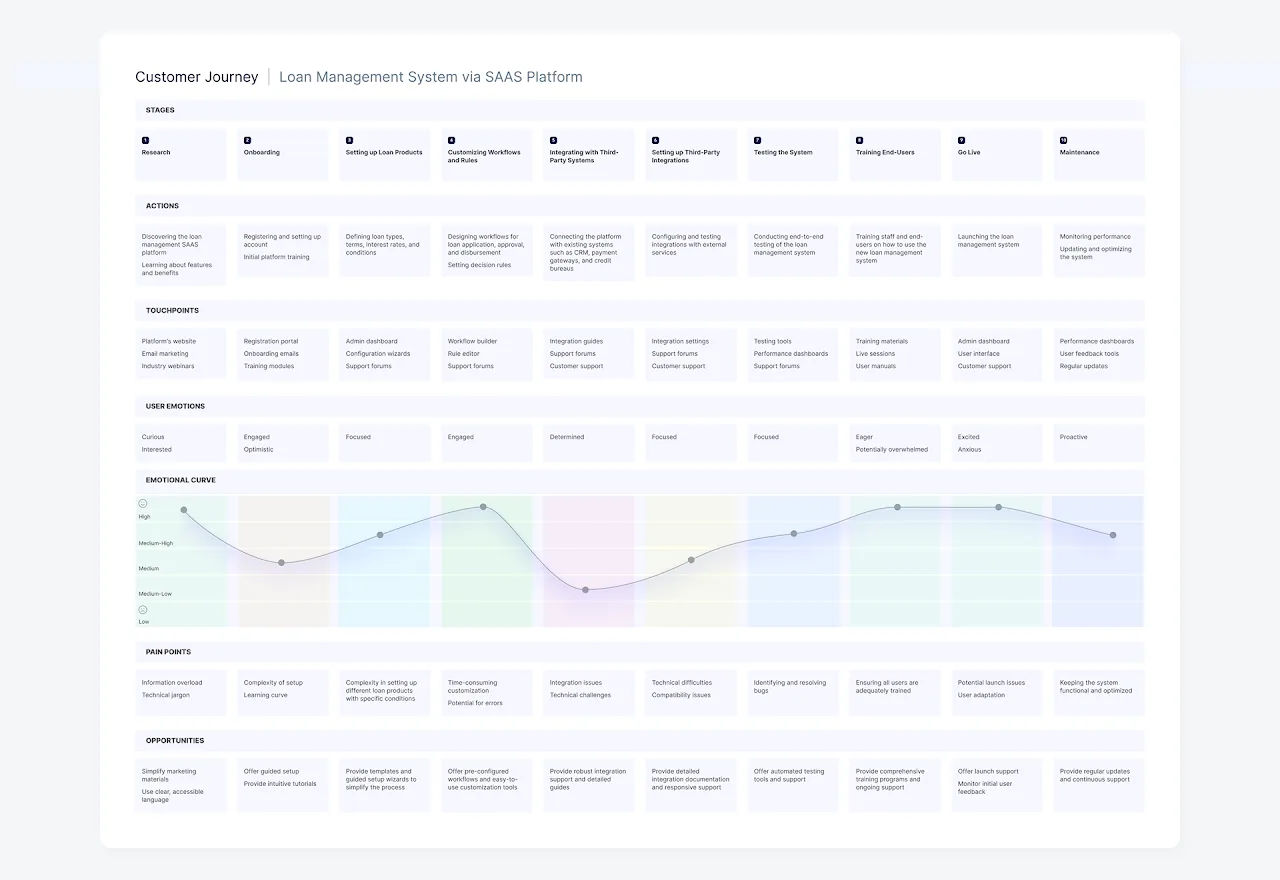
The platform began as an engineering-heavy internal decisioning system, and the goal was a no-code product that business teams could run on their own. To understand how users adopt and work with it over time, I mapped the full journey from initial onboarding to workflow configuration, integrations, testing, and long-term usage. The map follows ten stages across actions, touchpoints, emotions, pain points, and opportunities.
Complexity wasn’t isolated to a single feature — it accumulated across multiple stages, with the highest friction during initial setup, integration with external systems, and configuring decision logic for the first time.
Journey stages
The journey starts before onboarding. While researching the platform, people already meet information overload and technical jargon, which calls for simpler materials in clear, accessible language. From there, the ten stages of the map group into five phases.
Onboarding
Map stages: Onboarding, Setting up Loan Products
- Actions: registering and setting up an account, initial platform training, defining loan types, terms, interest rates, and conditions.
- Pain points: complexity of setup, a learning curve, and different loan products that each carry specific conditions.
- Opportunities: guided setup, intuitive tutorials, templates, and setup wizards.
Workflow configuration
Map stage: Customizing Workflows and Rules
- Actions: designing workflows for loan application, approval, and disbursement, and setting decision rules.
- Pain points: time-consuming customization and potential for errors.
- Opportunities: pre-configured workflows and easy-to-use customization tools.
Integrations
Map stages: Integrating with Third-Party Systems, Setting up Third-Party Integrations
- Actions: connecting the platform to existing systems such as CRM, payment gateways, and credit bureaus, then configuring and testing those integrations.
- Pain points: integration issues, technical difficulties, and compatibility issues.
- Opportunities: robust integration support, detailed guides and documentation.
Testing
Map stage: Testing the System
- Actions: end-to-end testing of the system.
- Pain points: identifying and resolving bugs.
- Opportunities: automated testing tools and support.
Long-term usage
Map stages: Training End-Users, Go Live, Maintenance
- Actions: training staff and end-users, launching the system, monitoring performance, updating and optimizing it.
- Pain points: making sure all users are adequately trained, potential launch issues, user adaptation, and keeping the system functional and optimized.
- Opportunities: comprehensive training programs, launch support, monitoring of initial user feedback, regular updates, and continuous support.
Where friction peaked
The map surfaced friction points, emotional drop-offs, and complexity peaks. Three moments stood out.
Initial setup
After a high first impression, the emotional curve falls to medium as soon as setup begins. Users face a complex setup and a learning curve, and each loan product needs its own conditions.
Integration with external systems
This is the lowest point of the whole journey. Teams connect the platform to CRMs, payment gateways, and credit bureaus, and run into integration, technical, and compatibility issues.
Configuring decision logic for the first time
Here the emotional curve is high: users are engaged. The friction sits in the work itself, because customization takes a long time and setting decision rules carries a potential for errors.
How AI fits into this work
This map was built without AI. Today, on complex B2B products, I use AI earlier in discovery: to analyse requirements, surface contradictions, prepare stakeholder questions, and describe user scenarios. It is most useful where one feature involves different roles, permissions, dependencies, and edge cases. AI accelerates the exploration; the decisions stay with design.
What changed in the product
The journey’s findings directly influenced the need for guided onboarding, reusable workflow patterns, a clearer system structure, and improved support for non-technical users.
They also led to restructuring the platform’s information architecture, navigation model, and reusable marketplace structure to better align with user mental models. Built around Marketplace, Organization, and Workspace domains, the new structure brought faster navigation, clearer domain ownership, and lower onboarding friction.
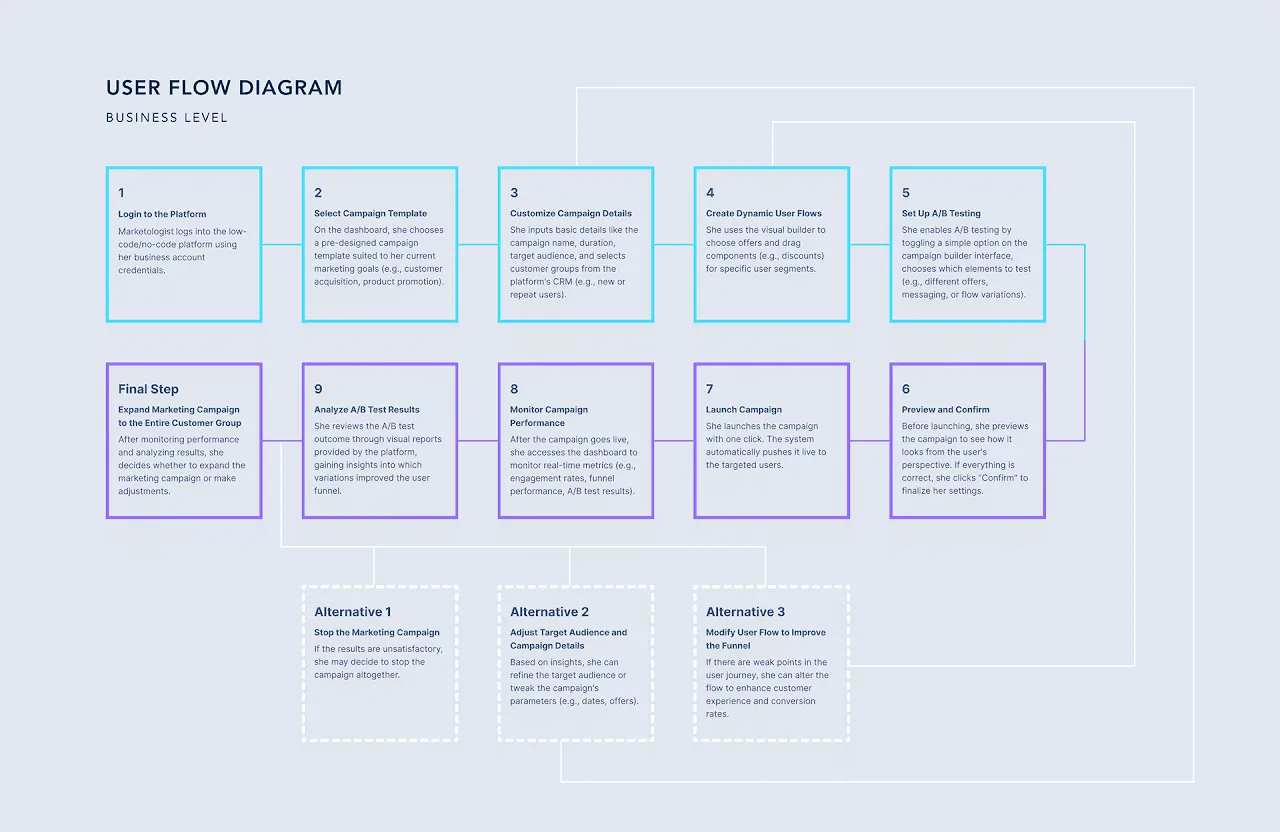
The business-level flow below shows one such path: from logging in to expanding a campaign, with defined alternatives when results fall short.