
Introduction
AI has become an integral part of how I design digital products. I do not use it only to generate images, write copy or create a quick UI concept.
I integrate AI across the full product design lifecycle: from analysing an initial idea to building user flows, designing interfaces, creating prototypes and reviewing implementation.
For me, AI is not a replacement for product thinking or design expertise. It is a way to explore more directions, structure complex information faster and reduce the time between an idea and a testable product experience.
My responsibility as a designer remains the same: understand the problem, make informed decisions and ensure that the final product is useful, clear and consistent.
Starting with Discovery
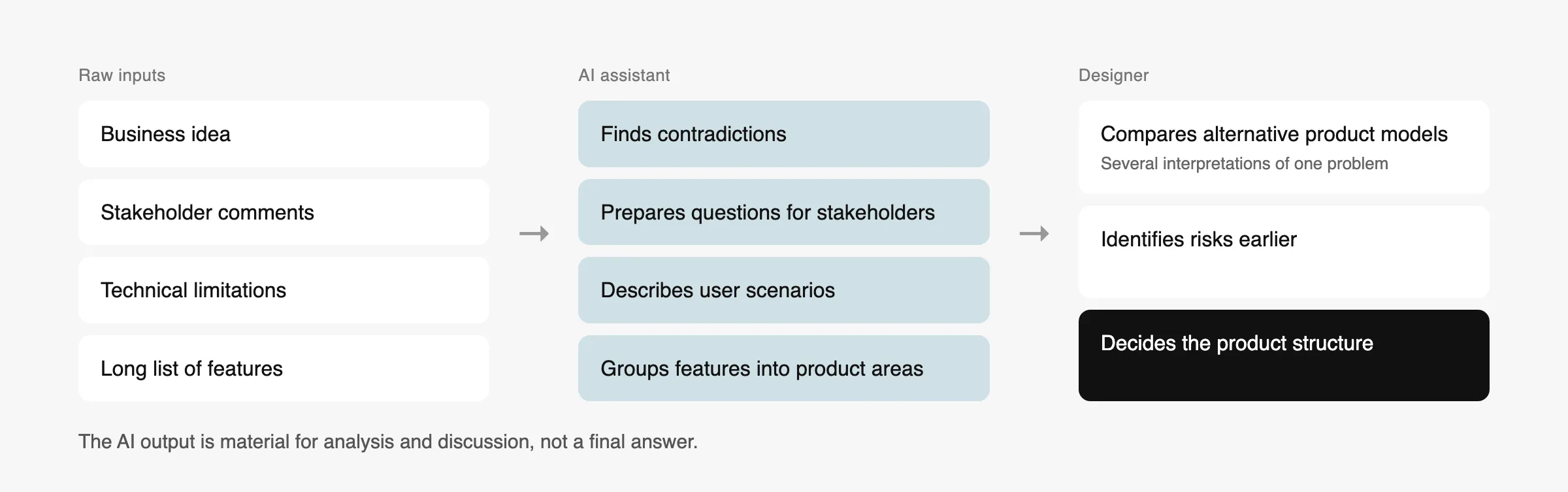
At the beginning of a project, information is often incomplete and unstructured. There may be a business idea, several stakeholder comments, technical limitations and a long list of potential features, but no clear product structure yet.
I use AI to help transform these inputs into a more organised foundation for design.
This may include analysing business requirements, identifying contradictions, preparing questions for stakeholders, describing user scenarios and grouping functionality into logical product areas.
AI also helps me explore alternative interpretations of the same problem. Instead of immediately designing the first obvious solution, I can compare several possible product models and identify risks earlier.
The output is not treated as a final answer. It becomes material for further analysis and discussion.
“AI accelerates exploration. Design expertise makes the decisions.”
Using AI for UX Exploration
One of the most valuable applications of AI in my process is UX exploration.
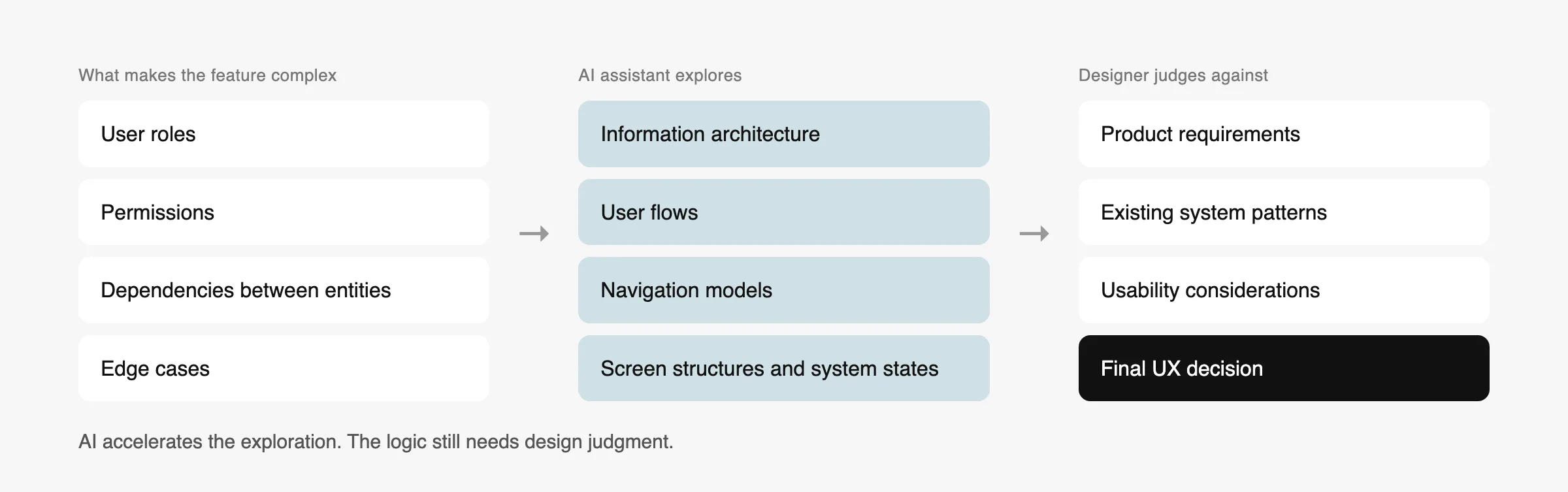
I use it to develop and compare information architecture, user flows, navigation models, screen structures and system states.
It is especially useful for complex B2B products where a single feature may involve different user roles, permissions, dependencies and edge cases.
For example, when working on functionality related to AI agents, prompts, skills and tool bundles, AI helped me structure the relationships between entities and explore how users could create, configure and manage them.
The final UX decisions were based on product requirements, existing system patterns and usability considerations. AI accelerated the exploration, but the logic still required careful design judgment.
Moving from Requirements to Interface Concepts
AI-assisted interface generation allows me to move from written requirements to visual concepts much faster.
I have used Figma Make and Claude Design to generate connected product screens, component states and layout variations.
This is particularly helpful when I need to review several directions before investing time in detailed design.
One example involved generating a set of payroll-related screens, including default states, alternative data-display modes and calendar views.
The generated output provided a starting point, but it was not treated as a finished design. I reviewed the information hierarchy, interaction logic, spacing, responsive behaviour and consistency with the existing design system.
This distinction is important: AI can create a plausible interface quickly, but a plausible interface is not automatically a good product experience.
Building and Maintaining Design Systems
AI is also useful in design-system work, particularly when a product already has components, tokens and code but lacks a clearly documented structure.
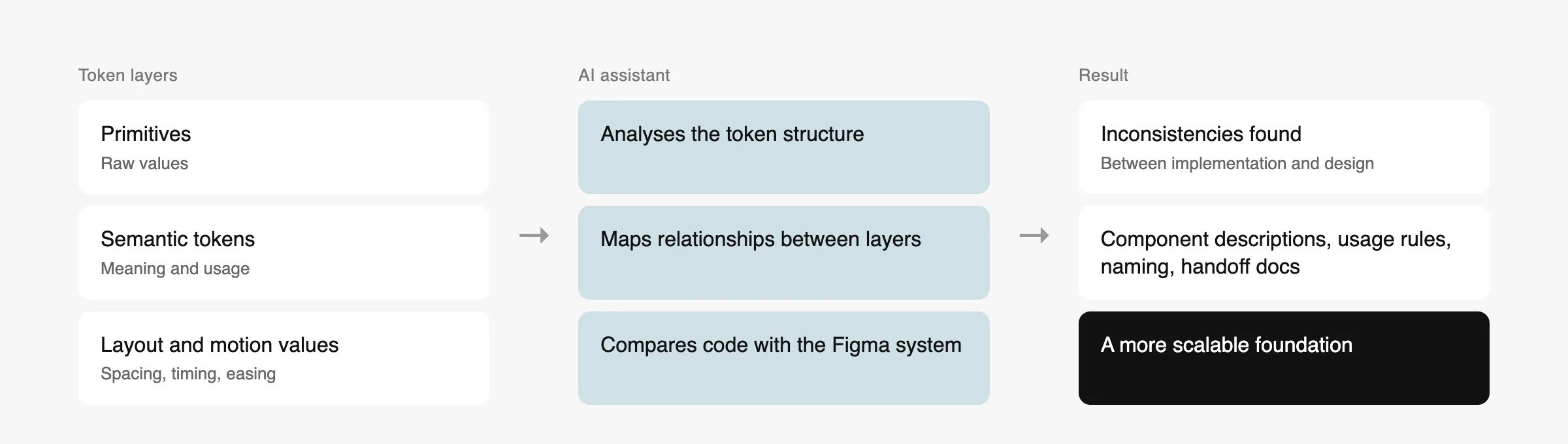
In one CRM project, I worked with a system containing 120 design variables divided into primitives, semantic tokens, layout and motion values.
AI helped analyse the token structure, identify relationships and prepare comparisons between the implementation and the Figma design system.
This made it easier to detect inconsistencies and create a more scalable foundation for future product development.
I also use AI to prepare component descriptions, usage rules, naming recommendations and handoff documentation. These tasks are often time-consuming, but they are essential for maintaining consistency across teams.
From Static Design to Working Prototypes
My AI workflow increasingly extends beyond Figma.
Using Claude Code, GitHub, VS Code and MCP integrations, I can move from static screens to working prototypes and test how a design behaves in a real browser.
This is useful for responsive layouts, animations and interactions that are difficult to evaluate through static mockups alone.
Creating AI-Assisted Visual Concepts and 3D Assets
I also use generative tools for visual exploration, art direction and 3D concepts.
My workflow may include image generation, iterative editing, Blender MCP, Higgsfield and Photoshop. However, I rarely rely on a single generated result.
I define the composition, materials, lighting direction, camera angle and level of visual detail. Then I review the output and refine it through several iterations.
For example, while developing premium 3D visuals for an enterprise AI product, I worked with graphite materials, controlled lighting and modular system compositions.
The goal was not simply to create an attractive render, but to communicate a product story through the visual structure.
In this type of work, AI acts as a production and exploration partner, while I retain control over the art direction.
Designing an AI Product with AI
One of the most interesting aspects of my current work is using AI to design products that are themselves built around AI.
I have worked on interfaces for managing AI agents, prompts, reusable skills, tools and automation workflows.
These products introduce new UX challenges. Users need to understand what the AI can do, what resources it can access, how it makes decisions and when human approval is required.
Designing these systems requires more than adding a chatbot to an existing product. It involves creating understandable mental models, transparent states and clear control mechanisms.
AI helps me analyse these complex relationships, but the experience still needs to be designed around human expectations and responsibilities.
My Role in an AI-Assisted Process
AI can generate options, but it cannot take responsibility for the product.
Throughout the process, I remain responsible for understanding user and business needs, defining the product structure, choosing the right UX direction and evaluating generated ideas.
I also remain responsible for designing interaction logic and system states, maintaining accessibility and consistency, ensuring visual quality, preparing the design for implementation and reviewing the final result.
The ability to generate more options is valuable only when the designer can recognise which option is appropriate and why.
Working with Startups, Discovery and MVPs
I have experience working with early-stage products where the initial requirements were incomplete or still evolving.
In these projects, my role has included clarifying the product idea, analysing user and business needs, defining the MVP scope, creating information architecture and user flows, designing prototypes and preparing the selected concept for development.
AI makes this process faster because it allows the team to explore, visualise and compare product directions earlier.
However, speed should not mean skipping discovery. The purpose of an MVP is not simply to release something quickly. It is to test the most important assumptions with the smallest meaningful product.
What AI Has Changed in My Work
The biggest change is not that AI designs instead of me.
“The biggest change is not that AI designs instead of me. It is that I can spend more time evaluating ideas and improving the product.”
I can explore more alternatives before choosing a direction. I can move from abstract discussions to something visible and testable sooner.
I can also collaborate with developers more closely because the distance between design and implementation has become smaller.
AI has not reduced the importance of design expertise. It has made design judgment even more important.
Tools I Use
- Research and Product Thinking: Claude, ChatGPT, Gemini
- UX and Interface Generation: Figma Make, Claude Design, Figma AI
- Prototyping and Development: Claude Code, GitHub, VS Code, MCP, Framer
- Visual and 3D: Blender MCP, Higgsfield, Seedream, Photoshop
Final Thoughts
I see AI as a new layer within the product design process rather than a separate tool or isolated step.
It supports research, UX exploration, interface generation, design systems, documentation, prototyping, visual production and implementation.
The strongest results come from combining the speed of AI with human understanding, critical thinking and attention to detail.
That is the approach I bring to my work: AI-assisted execution guided by product thinking and design expertise.